 Spybot Search & Destroy Spybot Search & Destroy
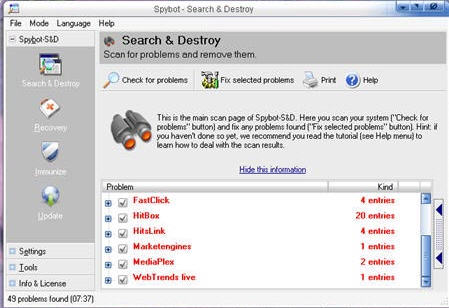 Spybot - Search & Destroy is one of the best ways to actually clean your computer of various spyware and adware you may have accidentally acquired on your computer. It is a FREE program, easy to download, install and keep updated, and absolutely essential if you want to keep your computer free of these obnoxious little cooties. Just letting Spybot scan your machine the first time and browsing what it has found can be a valuable lesson in what your computer can pick up behind your back. Spybot - Search & Destroy has been around a while and is a popular tool for one reason... It works great and you won't waste a lot of brain cells using it. If you are a new computer user, you can trust it to safely identify and remove tracking cookies, spyware and adware from your machine. Spybot - Search & Destroy is one of the best ways to actually clean your computer of various spyware and adware you may have accidentally acquired on your computer. It is a FREE program, easy to download, install and keep updated, and absolutely essential if you want to keep your computer free of these obnoxious little cooties. Just letting Spybot scan your machine the first time and browsing what it has found can be a valuable lesson in what your computer can pick up behind your back. Spybot - Search & Destroy has been around a while and is a popular tool for one reason... It works great and you won't waste a lot of brain cells using it. If you are a new computer user, you can trust it to safely identify and remove tracking cookies, spyware and adware from your machine.
Spybot - Search & Destroy is something you need to do at least once a week. If you haven't run it, or any other spyware/adware program before, the first results can be daunting. There have been times I have run it on someone's machine, seen a huge list, and just held my nose and let Spybot clean it all out, hoping the computer would reboot and the end of the ordeal. Every one has been fine so far, and that has added to the confidence level I have for this fine freeware utility.
The default settings when you first open Spybot and click the Check for problems button are more than sufficient for most users, certainly an eye opener when you see the results, but there are plenty of settings you can tweak once you learn more about the program. To see a more advanced view of Spybot, click the word Mode at the top of the Spybot main window, then click the word Advanced. The tabs on the left of the main window are an interesting browse. Click the little + sign to the left of each to see the various options. Each tool you click in the left panel will cause the controls or other information to appear in the right panel.
There is a great HELP area in Spybot. Spend some time reading it. Click the word Help at the top of the main window, then click the word Help again to learn more. There is also a very good tutorial available in that same area.
If you don't have Spybot - Search & Destroy already, be sure to visit the website, download it, use it at least weekly, and ENJOY your computer!
and for even more (Thanks Nicole):
The Network Security Guide from Answers.com
http://networking.answers.com/
Got questions?
Search mrswizard.com and compuquicktips.com
with Google!
|